Hello There
Hey, you! Yes, you read that right. I’ve replaced my Obsidian setup with
Neovim and Typst.
I opened Obsidian one morning.
Blank screen.
No notes.
I could have spent an afternoon debugging an Electron app.
Instead, I spent a week replacing my entire note-taking workflow with a
relatively young typesetting system, and I love it.
I am a huge fan of Obsidian. I’ve convinced several people to give it a try.
I’ve even created my own plugin and donated money to the Obsidian project.
So let’s start with the good parts: What was my setup and why was it so amazing?
My Old Setup
This is just a short summary, if you want to know it in more detail, check out
this
blog post.
Obsidian, My Beloved
Obsidian, Obsidian, Obsidian. I’ve been using it for roughly a year.
I’ve been using it for writing (e.g. the blog posts I wrote in the past), taking
notes (trying to link every tiny detail I can find, building a
Zettelkasten along the way),
flashcards using Anki and at some point even task
management.
I would say that whenever I actually try to use something, I quickly become a
power user. Obsidian was no different. This, of course, made me feel amazing - I
knew more than anyone else around me.
Own Plugin
This even went as far as creating my own plugin. I created the plugin TickTones
(which you may be able to find
here, but I don’t know for
how long, since I’ve deleted my GitHub account (more on that later)).
Developing this plugin was fun and I got to interact with some parts of the
community - it is a great feeling knowing that somebody actually uses the
projects you develop 😀
Anki
Anki was (and still is) my go-to tool for flashcards. It is a core part of
my learning workflow. In Obsidian, I actually utilized a plugin to convert
simple Markdown files into Anki flashcards (which, now thinking about it with a
fresh mind, sounds like a classic “trying-to-get-one-tool-to-do-everything”
situation).
This workflow felt amazing - just create a note in Obsidian in a specific way,
tag it, and your flashcard is ready to be reviewed.
Syncthing
Syncing my notes from one device to another was something I had already been
doing (thanks to me wanting to sync other things as well). For this, I am using
Syncthing - a tool that I’ve been using for a while
now, and I am very happy with it.
Markdown
Markdown was the format that was used for all my notes in Obsidian. Naturally,
just after I switched to Typst, I found out that there actually are plugins
available to let
Obsidian use Typst,
but this is not native and will likely feel a little bit hacky.
As far as I knew, Markdown was also really easy to use - just one simple way to
write your documents (oh, if I knew…).
Why It Broke
Now we get to the interesting part. What could possibly break in my setup
(except for Obsidian, of course, but that is to be expected)?
Obsidian
Yeah, I just said it: Obsidian, of course, is the main reason for my switch.
Not being able to use my notes because an
electron-based
app (consuming enough memory to noticeably affect my older machine) doesn’t want
to load today is not a great feeling.
But this isn’t the only Obsidian-related issue I had.
Bad Mobile UI/UX

First of all, the layout of the mobile app does not fit my workflow at all. When
I am on my phone, I want to view my notes and search through them, not
edit an arbitrary page. I actually don’t like writing on my phone. I just want
to retrieve knowledge or make minor edits. 1
Then there is the load time. On my phone, the app can often take roughly 30
seconds to load. In this time I can install another file browsing app, open a
note, do my edits, uninstall it and the app still isn’t launched.
This is so bad that community members made a plugin, just to load other
plugins later, in the hope of making the app load faster. This just felt
completely bonkers to me. 2
Plugins, Customizations, and Themes
As mentioned in the introduction, I am a huge fan of customization. This means I
spend a lot of time “perfecting” my setup and finding minor tweaks or
improvements along the way.
This, however, started feeling like a big waste of time in Obsidian. But I could
not stop myself. I’ve been trying out a new plugin here and there, maybe a new
theme, custom CSS snippet or anything else.
Yes, customization is a good thing (more on that later), but in Obsidian it felt
useless because I just use it to write notes on my desktop - for nothing else.
Vim Mode
I’ve been using Neovim for a long time. My entire muscle
memory is based on my own custom Neovim bindings.
This results in a problem in Obsidian, since I cannot easily replicate that
workflow. Yes, vim mode exists, but the bindings are not the ones I am used to
3.
The only saving grace would be
a plugin which adds vimrc support,
but since I heavily rely on
NixOS
and the Lua configuration of Neovim, this
does not solve my issue.
Syncthing
Syncthing, as I mentioned earlier, is an amazing tool. The only problem it has
is frequent file changes, which happen simultaneously on different devices. This
is exactly something Obsidian does, which results in many conflicts4.
Yes, there are some strategies to reduce the amount of conflicts, such as
creating a different profile for each device, but I still get roughly one
conflict every single day. This might not seem like a lot, but it’s these mild
annoyances which, over time, drive you insane.
Markdown
Oh, of course, there also is Markdown5.
Inconsistent Syntax
The syntax is just inconsistent. Yes, things like # Headings or *bold* text
are (most of the time) the same, but this is not the case for the rest.
Just take a look at Obsidian’s Markdown link syntax: [[Links]] with
[[Link|Named Links]]. This is not “vanilla” Markdown. Using this link syntax
might work for some editors, but break for others.
Markdown’s strength is also its weakness: it is simple and widely supported, but
different tools often extend it in incompatible ways, which is a problem once
such software stops being maintained.
Markdown was never designed to be a complete document format.
Math
Math syntax? Yeah, Obsidian just embeds
LaTeX in your notes. You can write it
with $...$ or $$...$$, but the choice of LaTeX just seems arbitrary.
If LaTeX is used anyway, why not just write your notes in LaTeX instead of
Typst? More on that in a bit.
And then the final boss of Markdown: PDFs. Generating a PDF from a Markdown file
requires you to use an external tool.
It may be a website, a local tool, or anything you can get your hands on, but it
won’t be simple or consistent. The output might look different all the time and,
unless you write your own generator, will never look the same6.
LaTeX?
Now, why didn’t I choose LaTeX over Typst? LaTeX is the industry standard, used
in universities and professional publishing. Just wait - the syntax of Typst is
much better and it fits my workflow.
Complicated
This is the main reason why I didn’t simply switch to LaTeX.
Did you look at the syntax? I mean, not as somebody who is used to it, but as a
beginner? LaTeX is incredibly powerful, but its mental model is closer to
traditional publishing than modern document authoring - for a new user, it just
is not intuitive and is very complicated.
This is a simple document that creates a Hello World page, with a centered
title:
\documentclass{article}

\title{My Centered Title}
\author{}
\date{}

\begin{document}

\maketitle

Hello, world!

\end{document}
Now, explain this for someone who is new. Why do we need a \documentclass? Why
“article”? I just want a page? Why do I need an author and a date?
What is this \begin and \end syntax? What is a document? Can I write outside
of it?
But It Is Popular
LaTeX is in use literally everywhere. This does not mean that it is good,
though. Yes, LaTeX has done an amazing job (especially for my CV7). But this
does not mean that we shouldn’t opt for something better, if it exists.
Popularity alone is not enough reason for me to choose a tool. Why are you using
Linux if Windows is more popular? Why are you using a programming language if
JavaScript is more popular (sorry JavaScript 🙃)?
Typst
Now, finally, let’s talk about Typst.
New
It is ✨new and shiny✨.
Typst was designed using decades of experience with TeX and modern document
tooling.
It is also written in 🦀 Rust 🦀!!!… Okay, I’ll stop before I get too far into
the Rust cult.
Easy
Typst is easy to use.
Take a look at the old LaTeX example above and compare it to the Typst version:
#align(center)[
  #text(size: 20pt, weight: "bold")[My Centered Title]
]

Hello, world!
It is more readable and has less boilerplate.
Of course, experienced LaTeX users rarely write this boilerplate themselves -
templates solve much of this problem. My issue is that the underlying system
still feels harder to understand.
I am sure that you can, without actually learning either Typst or any
programming, understand a large chunk of it.
You may be hung up on the #align(center)[]. Yes, maybe the [BLOCK CONTENT]
is a bit confusing (it is simply everything that is affected by it), but
#align(center) should be pretty self-explanatory.
As for a #text[size: 20pt, weight: "bold"][My Centered Title], this honestly
does not need any further explanation.
And then the text itself - there is no need for a \begin{document} and
\end{document}. It is just the text you want to write8.
Speed
Typst is fast to compile.
Compared to LaTeX, I would say that it is (according to my experience) at
least ten times as fast to compile.
For live previews, it is even faster - it feels instant. Maybe there are a few
milliseconds of delay, but compared to LaTeX, it is barely noticeable.
Simpler Math Syntax
Typst math syntax is simpler and more consistent than LaTeX.
Just compare these two examples, the first one is LaTeX, and the second one is
Typst9:
\[
f(x) = \frac{\sum_{i=1}^{n} \alpha_i x_i^2}{\sqrt{1 + \beta^2}} + \int_0^\pi \sin(x)\,dx
\]
$
f(x) = (sum_(i=1)^n alpha_i x_i^2) / sqrt(1 + beta^2) + integral_0^pi sin(x) dif x
$You can instantly see that one is easier to type and understand.
It is not the characters that matter (even though I prefer fewer \ in my
math), it is the representation, which is closer to the visual idea.
Also, since Typst is used for the entire document and not just the math syntax,
the syntax feels in place and not “off” (as it does in a Markdown document).
Tradeoffs
I do not want to only glamorize Typst, so here are some things I dislike.
Ecosystem
I miss the huge LaTeX ecosystem.
The things which exist in Typst are great, but it is so much smaller compared to
LaTeX. This also includes templates and other libraries.
Younger Project
I accept that Typst may not exist forever.
The project itself is young, which may lead to it being abandoned. I personally
do not think this is the case, since it is open source and has a solid business
model, but this is a valid point.
Fewer Integrations
I miss just works integrations.
Typst, since it is so young, has fewer integrations. This is also true for
Neovim, where there is only one mature LSP, which doesn’t even support every
single feature yet.
Neovim
Now to my text editor, personal religion and lifestyle choice: Neovim.
Already Used
Neovim is something I already use. I know it is hard to believe, but since I
already have my PDE10 already set up and working, it just feels strange to not
use it…
When I’ve spent so much time setting up my PDE, I want to use it everywhere I
can.
Unify Setup
This directly ties into the previous point. I want to reduce the amount of
apps I have to use. This means using one tool for as much as I can do, as long
as it is the right tool for the job11.
My New Setup
Now let us take a look at my personal setup. Maybe this can inspire you to give
it a try.
What was important for me to realize was that I needed two different solutions:
One for editing documents and one for rendering documents.
Neovim solves the first. Typst solves the second.
Typst Configuration
For Typst, I am (obviously) using a nix flake. My Nix flake allows me to easily
create notes in my required format and compile them into PDFs. My Nix flake is
generally pretty simple, with a few key exceptions12:
A Script to Create New Notes
I’ve created a custom script which allows me to create a new note.
The main reason is that I always want my notes to be in_this_format.typ and to
include some boilerplate content by default.
A Script to Compile All Notes
I’ve also created a custom script which allows me to compile all my notes, using
a hash-based caching system to only recompile when necessary.
This one exists because when you compile a document using Typst, it actually
compiles it. For my specific setup, I would like it to only compile if the
content has actually changed.
Neovim Configuration
Now, for Neovim, I am using my configuration which can be found
here.
The most important parts are the Typst LSP and the markview-nvim plugin.
Typst LSP
The Typst LSP allows me to have syntax highlighting, in-line errors and
:TypstPreview, which is a live preview of my current Typst document (using the
above mentioned near-instant live preview).
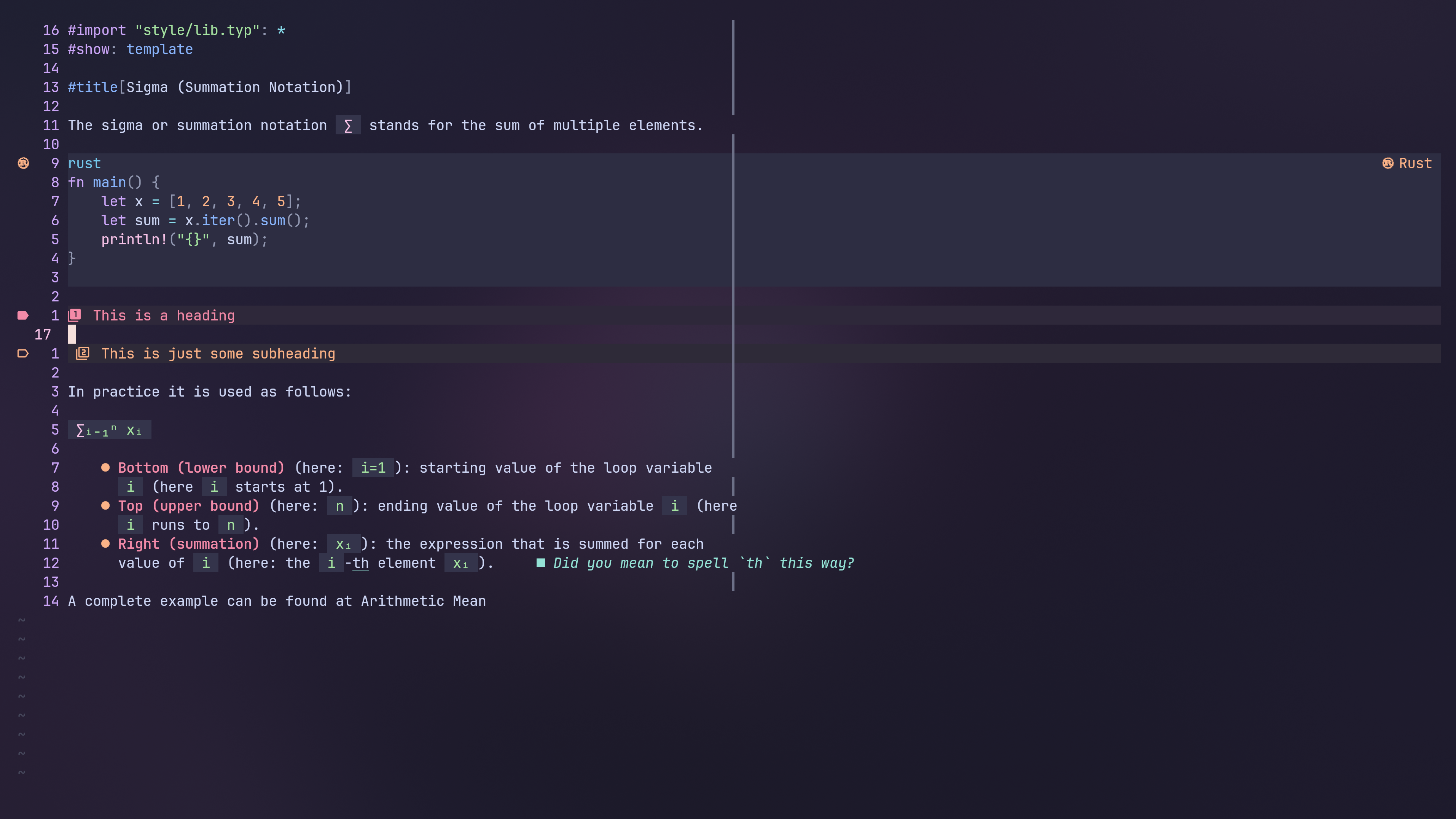
Markview-Nvim
This plugin renders Markdown, Typst, and LaTeX documents in Neovim. This means,
while I am not in insert mode, my documents look like this:
Example Pages
Now let’s actually get some examples. How would I style my notes?
Honestly, if you are not very specific about what you want, you can simply just
use the default styling.
The default styling looks like this:
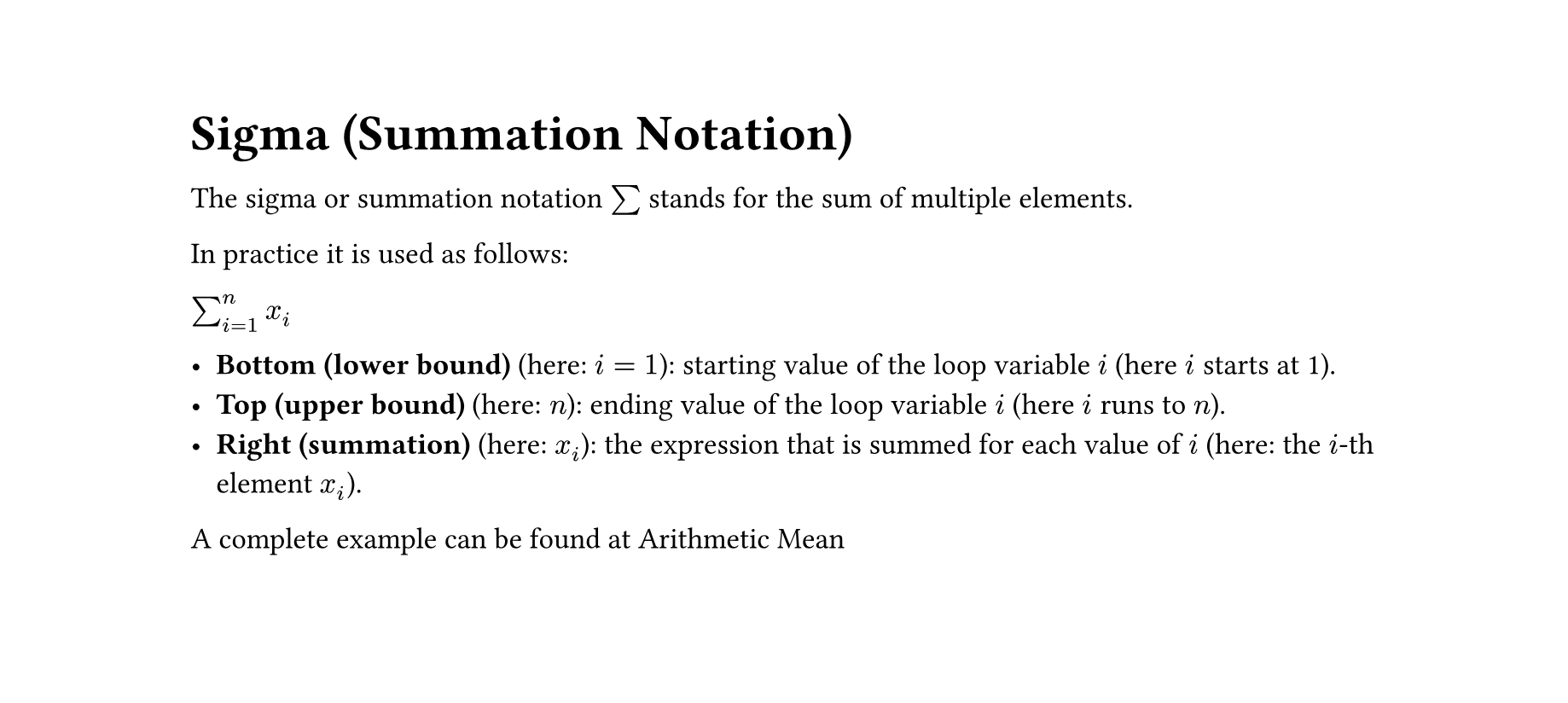
… which is actually fine for an academic document, but I prefer something more
like this:
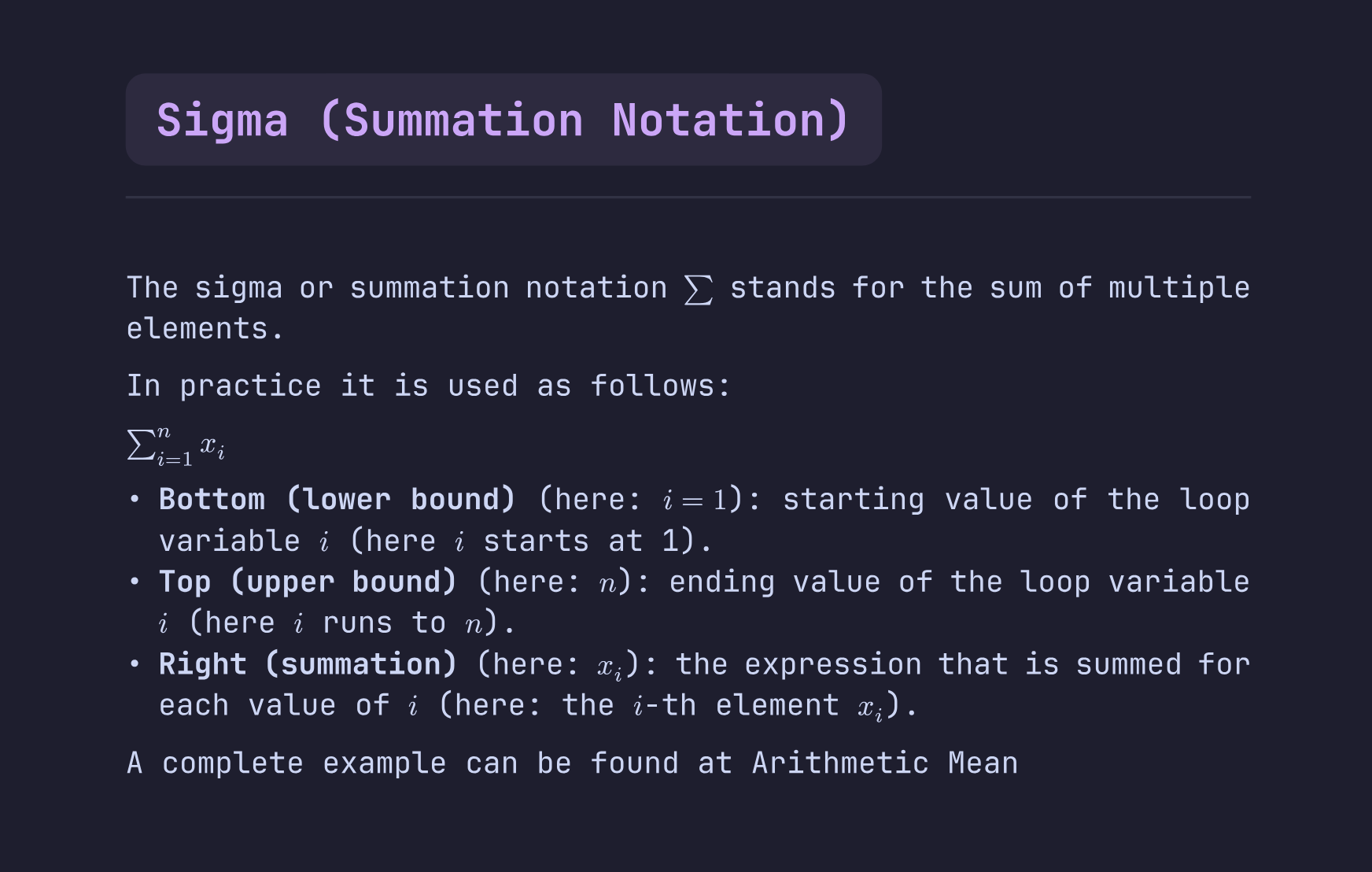
… which uses my Catppuccin theme, a larger font size, my preferred font and a
readable spacing.
For the unstyled example, you don’t need to style anything, this is how it
looks out of the box.
Let’s take a look at a simple example:
// Styles all headings
// `#show` to specify styling
// `heading` to specify styling for headings
#show heading: it => {
  // Creates a box filled with an accent color
  box(fill: accent)[
    // Inserts the actual text of the heading
    #it.body
  ]
}
This is the part I like about Typst: customization feels like programming rather
than fighting a template system.
For my style, I’ve customized more things. If you are interested, reach out to
me and I can share the styling.
Mobile Experience
And the mobile experience is actually good. Yes, I am not using Neovim on my
phone, but having a tool which just searches files and allows simple editing is
just so much snappier than Obsidian.
To be exact, I am using
this F-Droid app,
but I am not tied to it. My criteria for my app were the following:
- Allows me to set up a default directory to open
- Allows me to search for and inside of files
- Allows me to open files
- Allows me to make very simple, plain-text-based edits
And actually, it was pretty hard finding an app which does that. Most of the
✨PKM productivity✨ mobile apps either do not allow me to set up my own
directory, or require me to use their specific format. This is why, in the end,
I went with a general file manager.
But What About Links?
In Obsidian, you can link to a note by using [[Link]].
This is something I heavily utilized to create my own
Zettelkasten.
Now, I personally no longer require direct links. I just take notes when I want
to remember something, or reflect on a topic.
For discoverability, I rely on my words, used in a way that will allow me to
later find them when using ripgrep - or
any other search tool I might use.
I no longer rely on any backlinks between my notes. At most, I use links to
external sources.
I use a Bibliography to
link to things such as books and websites, which is actually a nice habit to
build when getting into academic work in the future.
Why Not Just Plain Markdown + Neovim?
You might wonder why I didn’t simply move my Markdown files into Neovim. The
answer is that Neovim solves the editing problem, but not the document problem.
I wanted a format that could naturally handle notes, math, and polished PDFs
without additional conversion steps.
Conclusion
Now let’s come to a conclusion.
TLDR
Obsidian is optimized for managing knowledge. I realized that what I actually
needed was a reliable environment for creating knowledge.
A week ago I thought I was just fixing a broken note-taking app.
Instead, I ended up replacing my entire writing workflow.
I expected compromises.
Instead, I found that my workflow became simpler:
- One editor
- One document format
- Faster mobile access
- Easier PDF generation
But, of course, there are some things I will probably miss from Obsidian:
- A beautiful UI without any tinkering
- Easy plugin installation and usage
- Built-in backlinks
But, of course, I would not recommend this setup for everyone. This setup works
for me because I live in Neovim and want to rely on this specific workflow.
Always try to find your own setup and workflow, and
stop chasing the perfect setup -
it does not exist.
Bonus: What About This Blog?
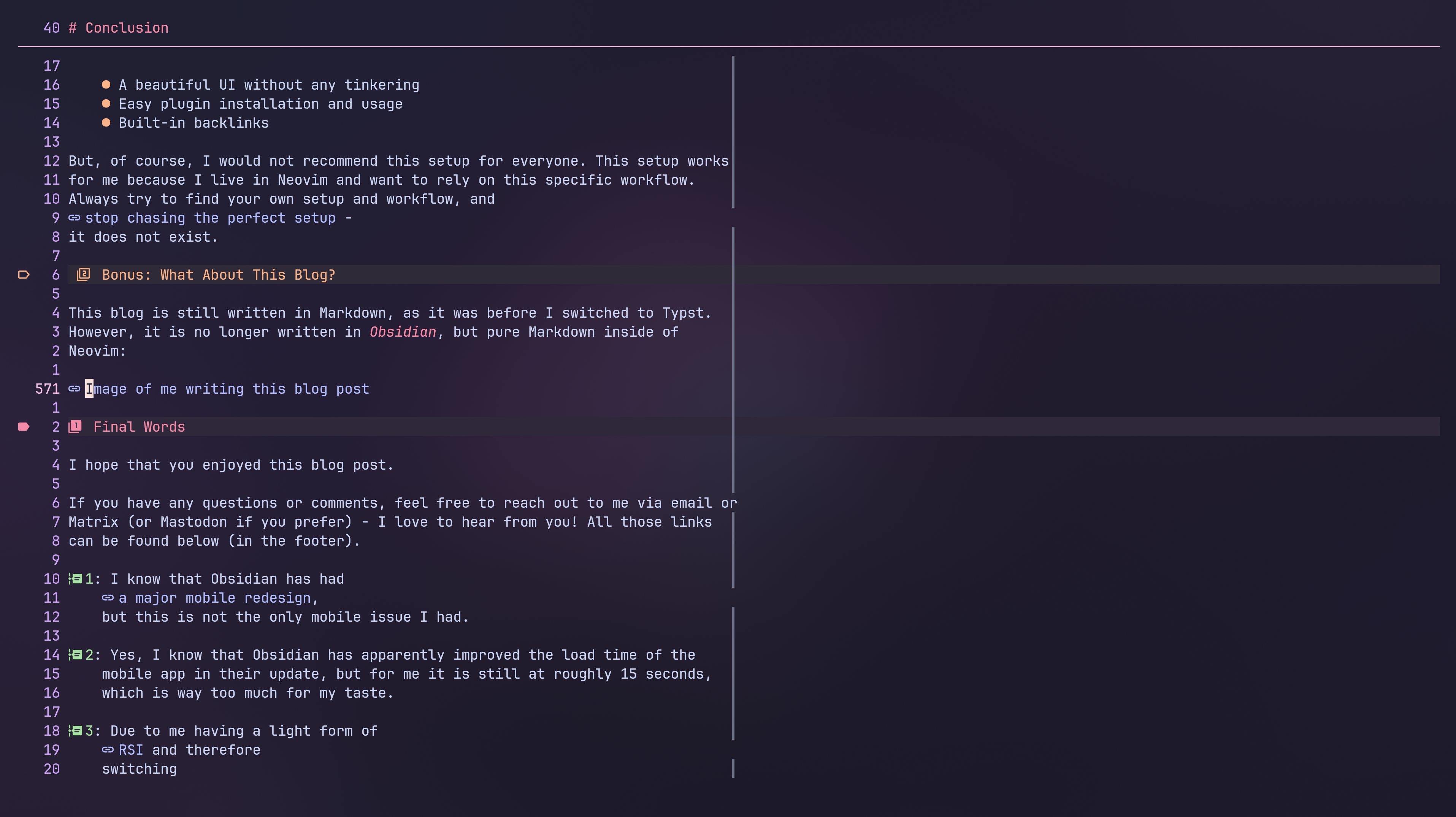
This blog is still written in Markdown, as it was before I switched to Typst.
However, it is no longer written in Obsidian, but pure Markdown inside of
Neovim:
Final Words
I hope that you enjoyed this blog post.
If you have any questions or comments, feel free to reach out to me via email or
Matrix (or Mastodon if you prefer) - I love to hear from you! All those links
can be found below (in the footer).
Footnotes
-
I know that Obsidian has had
a major mobile redesign,
but this is not the only mobile issue I had. ↩ -
Yes, I know that Obsidian has apparently improved the load time of the
mobile app in their update, but for me it is still at roughly 15 seconds,
which is way too much for my taste. ↩ -
Due to me having a light form of
RSI and therefore
switching
to a custom keyboard
with a custom layout,
my bindings are different compared to the “default” vim bindings. ↩ -
This has even gone as far as creating
my own project just to
make it easier to resolve those conflicts. ↩ -
I won’t go into excessive detail here, but if you are interested, you can
find a good blog post
here ↩ -
Of course, it is possible to always use the same generator. Or maybe
convert it to HTML first, apply your styling and then convert it to PDF -
but this is just way too complicated for generating a simple styled
document. ↩ -
Until I rewrote my CV in Typst 🙃. ↩
-
Yes, you have two paths here: Either you do inline styling, which might
require more work, or you use styles. For me, I am not even using the
#align[center](TITLE)part. I just have my#title[MY TITLE]styled as I
like it, and just use it. More on that in a bit. ↩ -
I know that it is technically possible to also use the
$...$syntax in
LaTeX, but that is not the “official” syntax. ↩ -
PDE in this context refers to “Personal Development Environment”. It is a
term I stole from
this video of TJ and greatly
prefer over the general
“IDE”
name - since my setup is actually my own custom environment. ↩ -
I would not want to use e.g. Neovim for managing my calendar, but I would
like to use it for everything writing-related. By specifying criteria, I
hope to avoid the IKEA effect
and
similar problems I encountered in the past using Notion. ↩ -
If you are interested in a current version of my flake or any other
parts, just reach out to me via email or Matrix. I am changing my setup more
than I change my underpants, so this will likely quickly become outdated. ↩